> ## Documentation Index
> Fetch the complete documentation index at: https://support.contenta.ai/llms.txt
> Use this file to discover all available pages before exploring further.
# Profile Settings
> Update your personal details, password, notifications, and account preferences.
The [Settings](https://www.app.contenta.ai/en/dashboard/settings) section gives you full control over your Contenta AI account and workspace preferences. From here, you can manage personal information, subscription details, security settings, billing, payouts, and platform usage in one place.
## To access Settings
Go to the Contenta AI dashboard and log in using your registered email address or connected sign-in provider.
Once inside the platform, scroll to the lower part of the left navigation menu where account controls are located.
Select [Settings](https://www.app.contenta.ai/en/dashboard/settings) to open your personal account management area, where you can control preferences and billing options.
Inside Settings, select the area you need such as Profile, Security, Billing, Pricing, Usage, or Earnings & Payouts.
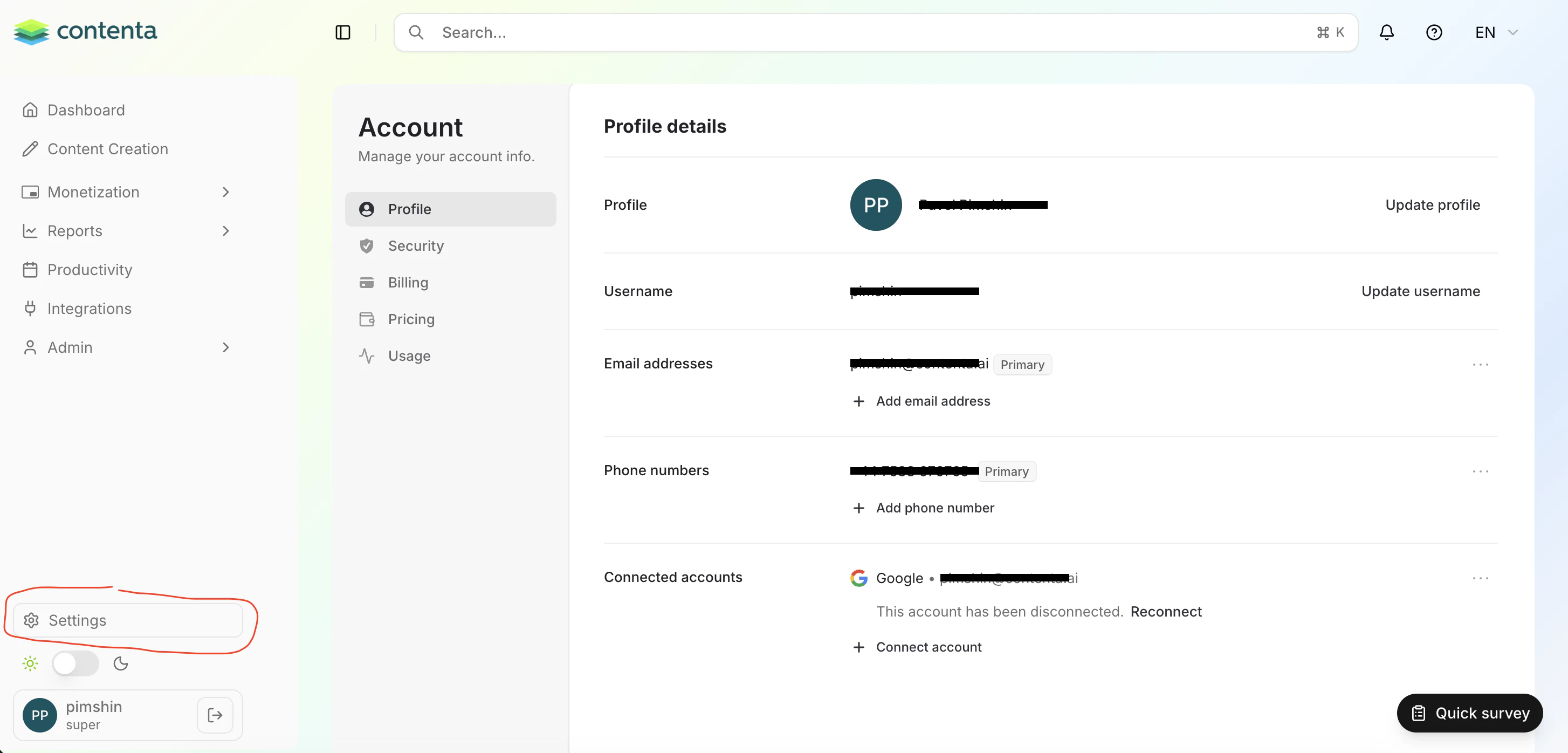 Inside Settings, you can typically access:
* **Profile** - Update your name, email, avatar, and connected accounts
* **Security** - Change password, manage login protection, and secure your account
* **Billing** - View invoices, payment methods, and subscription history
* **Pricing** - Upgrade or change your Contenta AI plan
* **Usage** - Monitor credits, limits, and platform activity
* **Earnings & Payouts** - Track revenue and manage payout preferences (if enabled)
Have a question not covered here? Email the Contenta AI support team at [support@contenta.ai](mailto:support@contenta.ai)
Inside Settings, you can typically access:
* **Profile** - Update your name, email, avatar, and connected accounts
* **Security** - Change password, manage login protection, and secure your account
* **Billing** - View invoices, payment methods, and subscription history
* **Pricing** - Upgrade or change your Contenta AI plan
* **Usage** - Monitor credits, limits, and platform activity
* **Earnings & Payouts** - Track revenue and manage payout preferences (if enabled)
Have a question not covered here? Email the Contenta AI support team at [support@contenta.ai](mailto:support@contenta.ai)