> ## Documentation Index
> Fetch the complete documentation index at: https://support.contenta.ai/llms.txt
> Use this file to discover all available pages before exploring further.
# Add Website
> Learn how to register your website with Contenta AI, complete ads.txt ownership verification, and track your site's verification status.
To begin generating revenue with Contenta AI Monetization solution, you need to register and verify your website.
## What you need to do
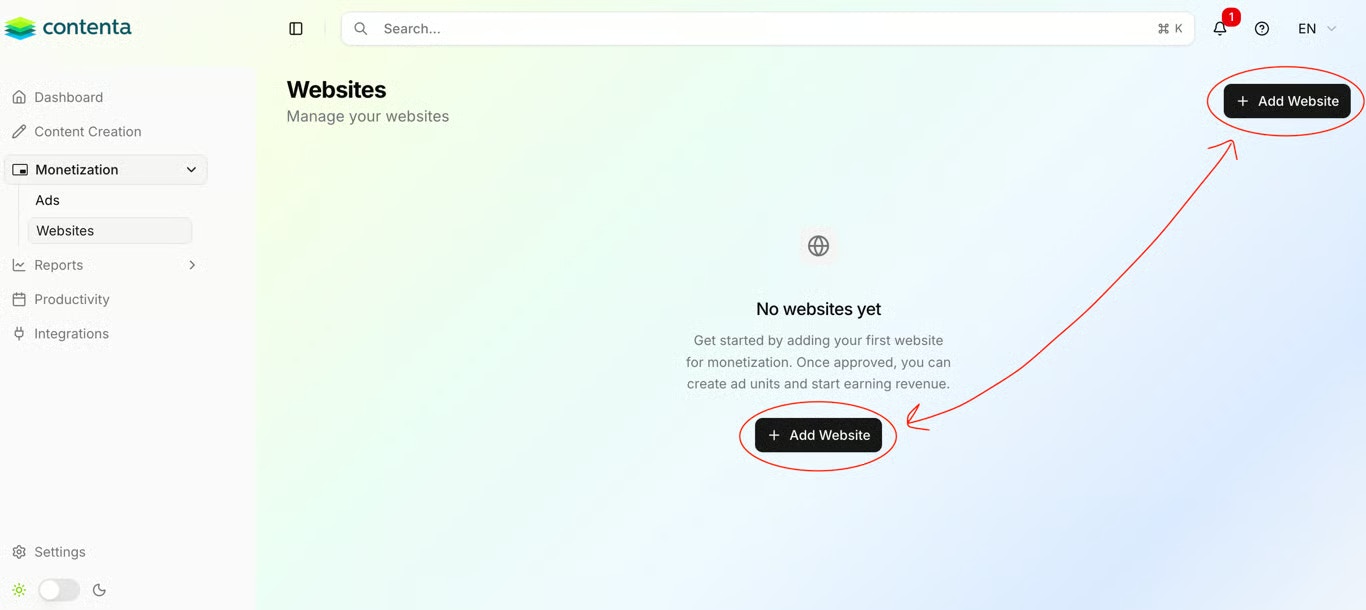
In your dashboard, go to the **Monetization** section and select the **Website** tab. Click **+Add Website** to open the registration form.
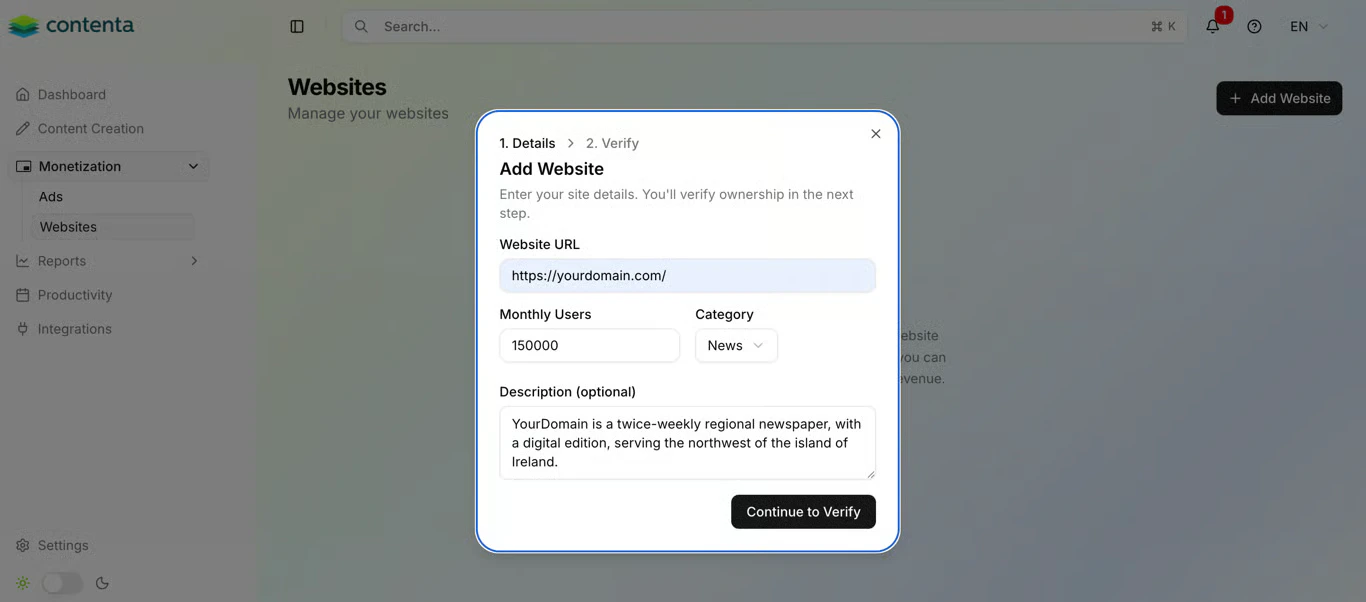
 Fill in the following fields to help Contenta AI categorize your site and match it with the right advertisers:
* **URL** - The full address of your website (e.g., `https://yourdomain.com`).
* **Monthly Visits** - An estimate of your current traffic volume.
* **Category** - Select the niche that best describes your content.
* **Description** (optional) - Briefly describe your audience and content focus.
Fill in the following fields to help Contenta AI categorize your site and match it with the right advertisers:
* **URL** - The full address of your website (e.g., `https://yourdomain.com`).
* **Monthly Visits** - An estimate of your current traffic volume.
* **Category** - Select the niche that best describes your content.
* **Description** (optional) - Briefly describe your audience and content focus.
 Adding a detailed description helps the system pair you with high-value private deals and advertisers looking for your specific audience.
To confirm you own the domain and prevent unauthorized monetization, you must add two lines to your `ads.txt` file.
Both lines must be present in your `ads.txt` file before Contenta AI can verify your ownership. Missing either line will leave your site in **Pending** status.
After submitting your site details, a popup will display your unique verification code and the required ads.txt line. Copy both lines and add them to your `ads.txt` file, each on a separate row:
```text theme={null}
contenta-verify-xxxxxxxxxxxxxxxx
google.com, pub-9253083092279736, RESELLER, f08c47fec0942fa0
```
Once the file is saved and publicly accessible at `yourdomain.com/ads.txt`, return to Contenta AI and click **Verify Ownership**. The system checks your file automatically and confirms ownership in seconds.
Adding a detailed description helps the system pair you with high-value private deals and advertisers looking for your specific audience.
To confirm you own the domain and prevent unauthorized monetization, you must add two lines to your `ads.txt` file.
Both lines must be present in your `ads.txt` file before Contenta AI can verify your ownership. Missing either line will leave your site in **Pending** status.
After submitting your site details, a popup will display your unique verification code and the required ads.txt line. Copy both lines and add them to your `ads.txt` file, each on a separate row:
```text theme={null}
contenta-verify-xxxxxxxxxxxxxxxx
google.com, pub-9253083092279736, RESELLER, f08c47fec0942fa0
```
Once the file is saved and publicly accessible at `yourdomain.com/ads.txt`, return to Contenta AI and click **Verify Ownership**. The system checks your file automatically and confirms ownership in seconds.
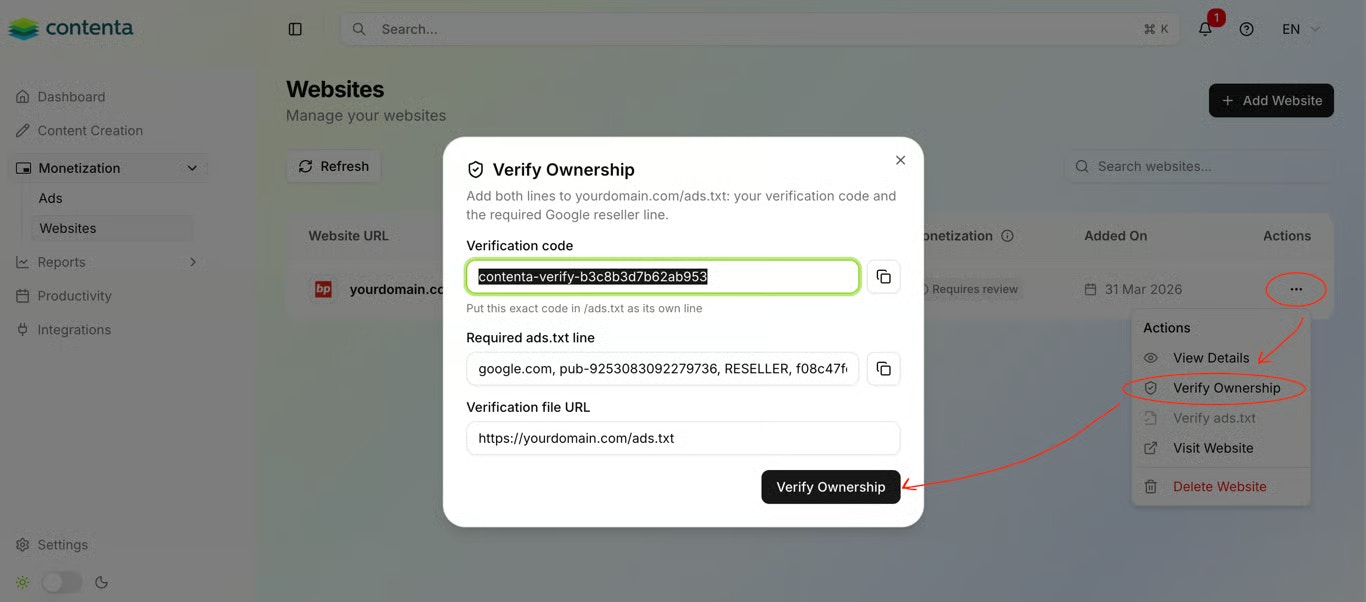 After submitting, your website appears in the list with a status indicator showing where it is in the verification process:
* **Pending** - The required records were not found in your `ads.txt` file yet. Check that both lines are present, each on its own row, that the file is publicly accessible at `yourdomain.com/ads.txt`, and that any recent changes are live (allow time for caching to clear).
* **Verified** - Ownership confirmed. Your website is now one step closer to monetization.
If you need to retrieve your verification code or ads.txt line again, click the three dots (**...**) next to your website in the list and open the **Verify Ownership** tab.
Have a question not covered here? Email the Contenta AI support team at [support@contenta.ai](mailto:support@contenta.ai)
After submitting, your website appears in the list with a status indicator showing where it is in the verification process:
* **Pending** - The required records were not found in your `ads.txt` file yet. Check that both lines are present, each on its own row, that the file is publicly accessible at `yourdomain.com/ads.txt`, and that any recent changes are live (allow time for caching to clear).
* **Verified** - Ownership confirmed. Your website is now one step closer to monetization.
If you need to retrieve your verification code or ads.txt line again, click the three dots (**...**) next to your website in the list and open the **Verify Ownership** tab.
Have a question not covered here? Email the Contenta AI support team at [support@contenta.ai](mailto:support@contenta.ai)