
Command Palette
Search for a command to run...
6.2 Connect to Google AdSense
You can connect your Google AdSense account to Contenta AI to import monetization metrics into Reports and gain better visibility into your website’s performance.
This integration helps you analyze revenue trends without switching between platforms.
Before you start
To connect Contenta AI with Google AdSense, make sure:
You have an active Google AdSense account
You are signed in with a Google account that has access to AdSense
You are logged into Contenta AI using the same Google account (or one with permission)
No API keys or manual credentials are required - the connection uses secure Google Sign-In (OAuth).
How to connect Contenta AI to Google AdSense
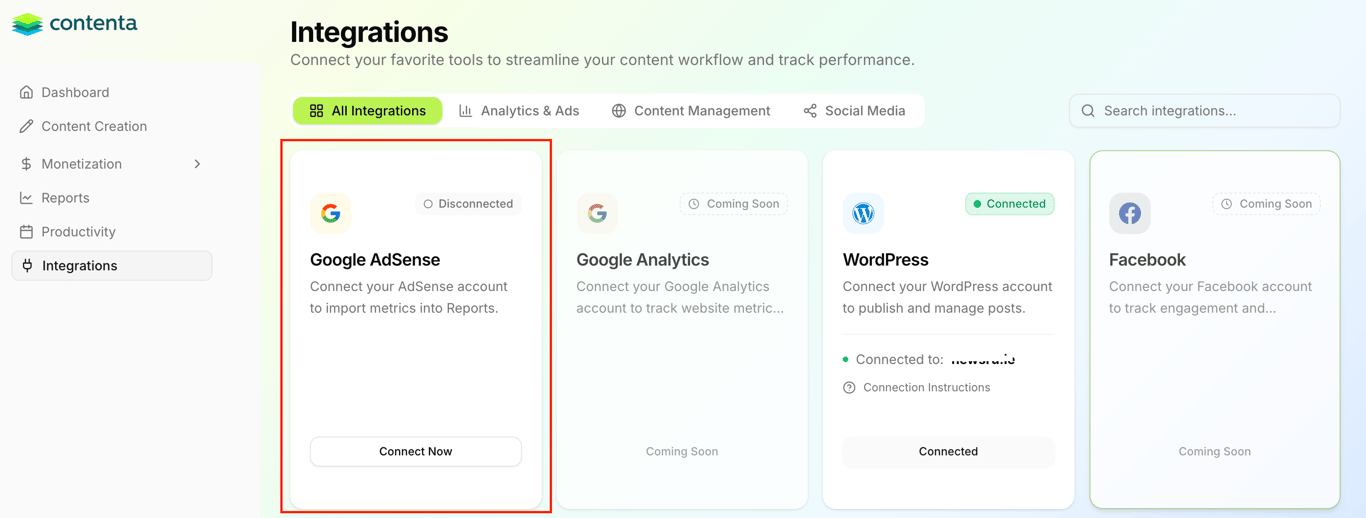
In the main menu, navigate to Integrations.
Locate Google AdSense under Analytics & Ads.
Click Connect Now.
You’ll be redirected to Google to complete the authorization.
Sign in with Google
Select the Google account associated with your AdSense account.
Review Contenta AI’s Privacy Policy and Terms of Service.
Click Continue to grant access.
Google will then redirect you back to Contenta AI.
What happens next
If the connection is successful, the AdSense integration status will update to Connected.
Contenta AI will begin importing available AdSense metrics into Reports.
You’ll be able to monitor monetization performance directly from the platform.
Note: Initial data sync may take a short time depending on your AdSense account size.