
To access Settings
1
Sign in to your Contenta AI account
Go to the Contenta AI dashboard and log in using your registered email address or connected sign-in provider.
2
Look to the bottom-left corner of the dashboard sidebar
Once inside the platform, scroll to the lower part of the left navigation menu where account controls are located.
3
Click Settings next to the gear icon
Select Settings to open your personal account management area, where you can control preferences and billing options.
4
Select the section you want to manage
Inside Settings, select the area you need such as Profile, Security, Billing, Pricing, Usage, or Earnings & Payouts.
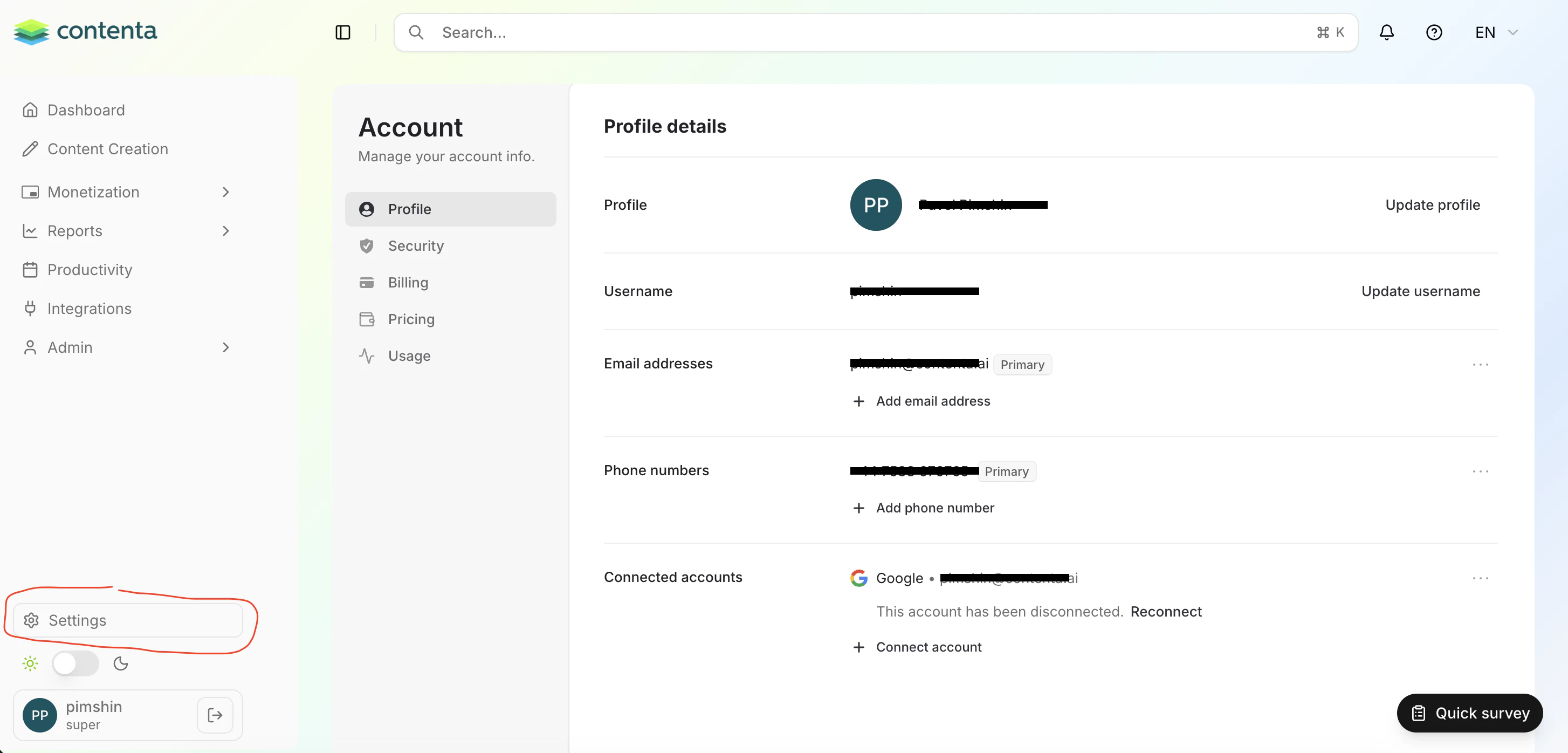
- Profile - Update your name, email, avatar, and connected accounts
- Security - Change password, manage login protection, and secure your account
- Billing - View invoices, payment methods, and subscription history
- Pricing - Upgrade or change your Contenta AI plan
- Usage - Monitor credits, limits, and platform activity
- Earnings & Payouts - Track revenue and manage payout preferences (if enabled)
Have a question not covered here? Email the Contenta AI support team at support@contenta.ai